



Most owners get told their website needs SEO by somebody who sells SEO. That isn't a diagnosis, it's a pitch. An afternoon of your own time and six free tools will tell you more about your site than any sales call, and at the end you'll have a written list you can act on, hand to a developer, or use to judge whether a quote is honest.
Every step below ends with a way to check that the step actually worked, because a step you can't verify is a suggestion rather than a step. And rather than invent a tidy example, I ran the whole thing on this site and left the awkward findings in. The screenshots are real, the problems are mine, and you'll see at least one thing I haven't fixed yet.
One note on the screenshots. Where a tool is public, you're looking at a real capture of this site being audited. Two of the surfaces here sit behind a Google login and block automated capture, so those are labelled recreations that mirror the current interface. It says so underneath each one.
Check whether Google has your pages at all
Everything else is wasted effort if Google isn't indexing you. Start here, always.
- Search
site:yourdomain.comin Google. No space after the colon. - Note roughly how many results come back.
- Open Search Console, go to Indexing then Pages, and read the indexed count plus the table of reasons underneath it.
The two numbers won't match, and the Search Console one is the real answer. Google is blunt about the operator in its own documentation: it doesn't necessarily return all indexed URLs, the list isn't always exhaustive, and a bare site: query doesn't rank the results, so the order is close to random. It was built for searchers, not for owners auditing themselves.
What you're hunting for in the Pages report is any important page sitting under Discovered, currently not indexed or Crawled, currently not indexed. Those mean different things. Google describes the first as a page it found but hasn't crawled yet, often because crawling then would have overloaded the site. The second means it crawled the page and chose not to index it, and Google explicitly says there's no need to resubmit the URL. That part matters, because plenty of advice tells you to hammer the Request Indexing button, and that isn't what the button is for.
If a money page is missing and the reason column doesn't explain it, check two self-inflicted blocks before anything else. Open the page source and search for noindex: one leftover meta tag tells Google not to list the page, and it gets left on live pages more often than it should. Then confirm your headline and service text are in that raw source at all. Google reads the HTML first, and text that only appears after JavaScript runs can wait hours, days, or even weeks to be rendered and indexed (Vercel, 2025).
How to know it worked You can name the number of pages Search Console says are indexed, and you have written down every money page missing from that number. If your services page or contact page is missing, stop the audit and fix that first. Nothing else on this list outranks it.
Common trap
Treating the site: count as a report. It's an estimate Google has said repeatedly isn't exhaustive, and watching it move week to week will send you chasing problems that don't exist.
Read what Google actually sees on your homepage
Right click your homepage, choose View page source, and use Ctrl+F to find three things:
<title>, and there should be exactly one that describes this page specificallymeta name="description", present and written for a human<h1, and again there should be exactly one
Now the part that contradicts most of what you have read elsewhere. Google doesn't publish a character limit for either one. Its title link documentation says there's no limit on how long a title element can be, and the snippet documentation says the same about descriptions. Both get truncated in results as needed, typically to fit the device width. The familiar 60 and 155 character numbers are rules of thumb for avoiding truncation on a typical screen. Useful, but not rules, and a 63 character title isn't a finding.
What Google does document is when it will rewrite your title for you, and those are real findings: half empty title elements, boilerplate repeated across many pages, titles that don't match the page content, and stale titles carrying last year's date. For descriptions, Google says identical or similar text on every page isn't helpful, and that long strings of keywords are less likely to be used as a snippet at all.
How to know it worked For your homepage and your top three service pages you can answer yes to all of these: exactly one title, exactly one H1, a description that isn't a copy of another page's, and nothing that reads like a list of keywords.
Common trap Counting characters instead of reading the sentence. Trimming a good 64 character title to 58 changes nothing. Rewriting a title duplicated across nine pages changes a lot.
Check that your money pages aren't competing
This is the most common problem I find on small business sites, and almost nobody looks for it. Two of your pages target the same phrase, so Google has to choose between them, and it often chooses the weaker one.
- List every service and location page in a spreadsheet.
- Next to each, paste its title and its H1.
- Read the column top to bottom and look for rows that would answer the same search.
Then confirm it with data rather than instinct. In Search Console open Performance, filter to a single query, and switch to the Pages tab. If more than one of your URLs appears for that query, they're splitting the signal.
Here's the real example from this site, and it isn't flattering. Search Console shows the phrase google maps seo company pulling 143 impressions with two of my own pages competing for it: /local-seo sitting at position 83.7 and /google-maps-seo-toronto at 47.6. The general page was outranking the specific one, and the specific one is the page that deserves to win. That's a fixable finding, and it fell out of a five minute check.
How to know it worked You can point at one query in your own Search Console data and name two of your URLs that both appear for it. Most sites have at least one. If you genuinely can't find any, you have either a very small site or an unusually disciplined one.
Common trap Deleting one of the competing pages. Usually the fix is to make one page clearly the target and point the other at it with a link, not to throw away a page that has already earned some authority.
Measure speed with real user data, not the lab score
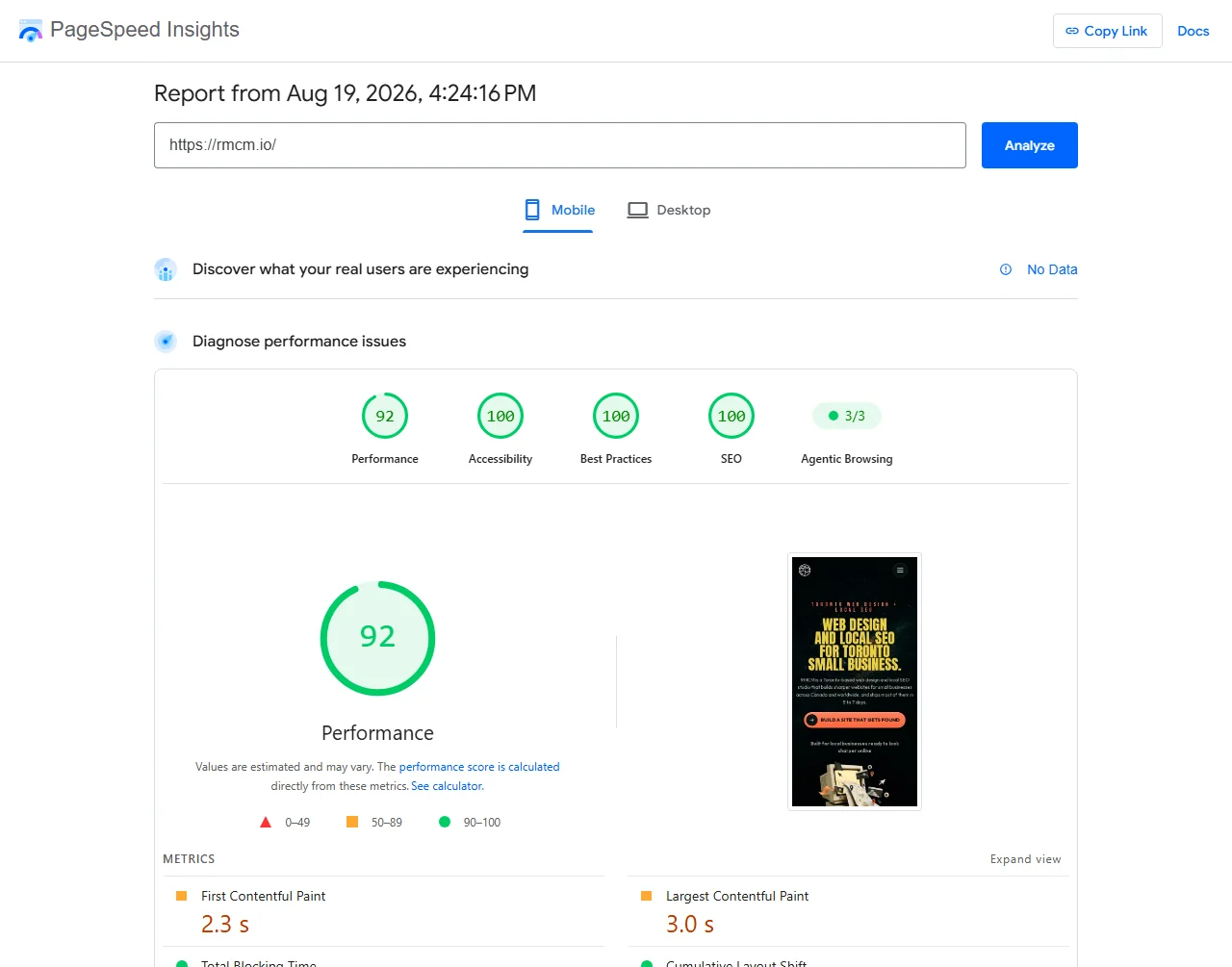
Open PageSpeed Insights, paste your homepage URL, and run it. Then ignore the big number for a moment and look at the top section, the one headed Discover what your real users are experiencing.
That section is field data: measurements from actual Chrome users who visited your site. The score below it is lab data, a simulation on a synthetic device. They answer different questions, and only one of them is what Google grades you on.
Three metrics matter, and web.dev gives the thresholds: LCP under 2.5 seconds for loading, INP under 200 milliseconds for responsiveness, and CLS under 0.1 for visual stability. Each is judged at the 75th percentile of page loads, split between mobile and desktop, so you're being measured by your slower quarter of visitors rather than your average one. INP replaced First Input Delay as a stable Core Web Vital in 2024, so if a tool or a blog post is still talking about FID, it's out of date.
 1
2
3
1
2
3
That screenshot is the whole lesson. This site scores 92 in the lab, 100 for accessibility, 100 for best practices and 100 for SEO, and none of it tells you what a real visitor experiences, because there isn't enough traffic yet for Chrome to have collected a sample. No data is itself a finding. It means you can't claim your site is fast for real users, and you can't claim it is slow either. You simply don't know yet, and the honest move is to write that down rather than screenshot the 92 and call it a result.
If you do have field data, read the three numbers and note which fail. INP is the one most sites fail, because it measures what happens when someone actually taps something, and that's usually where the JavaScript lives.
How to know it worked You can state your three field numbers and whether each passes, or you can state that you have no field data and explain why that is. Either is a real answer. Reciting the lab score isn't.
Common trap Chasing 100 in the lab. It's the most satisfying number on the page and the least connected to what your customers feel. If the field section is empty, optimising the lab score is guesswork with a progress bar.
Validate your structured data, twice
Structured data is the block of JSON in your page source that tells search engines and AI assistants what your business is, where it is, and when it's open. Two free validators check it, and you need both, because they check different things.
- Run your homepage through the Rich Results Test. This tells you which Google features your markup is eligible for.
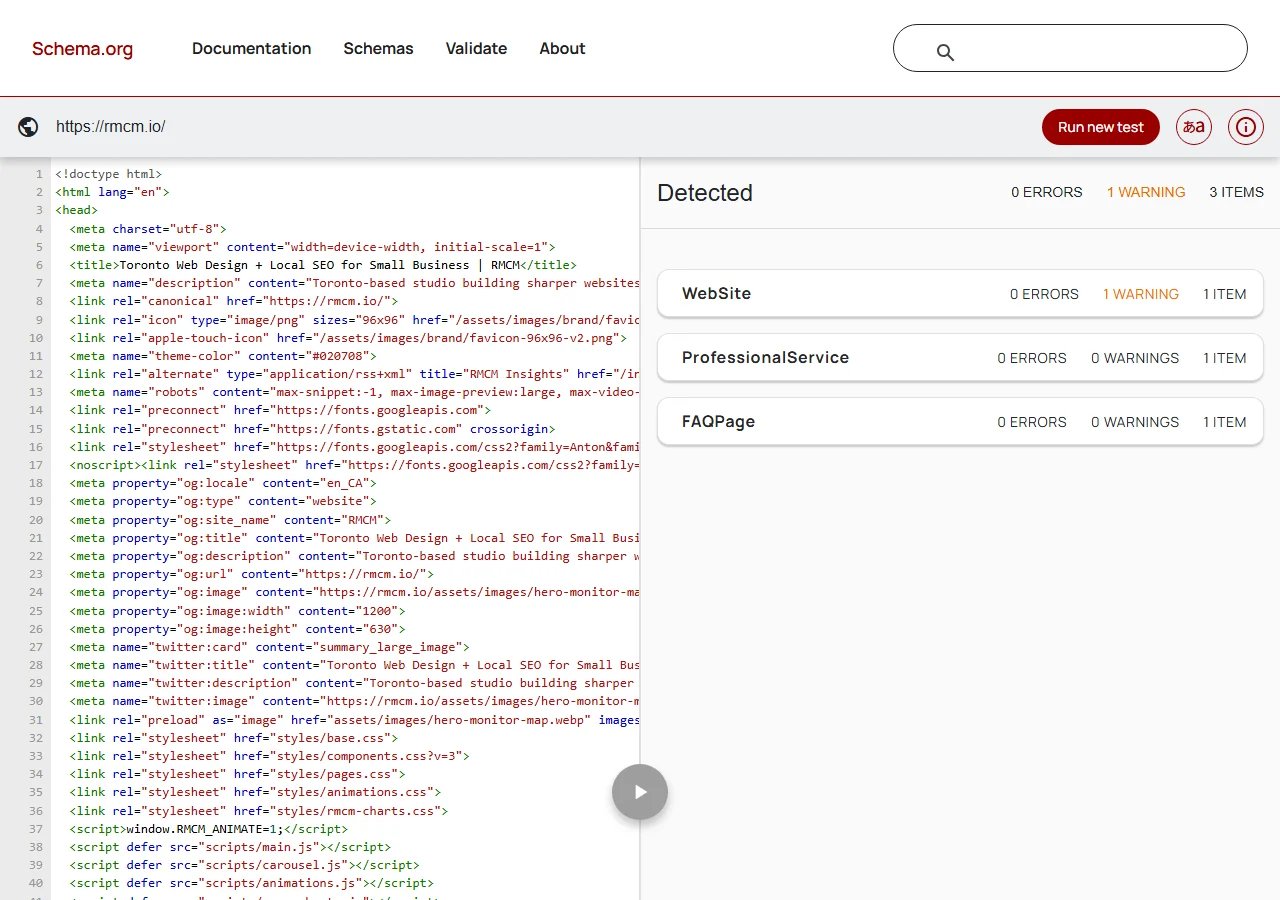
- Run the same URL through the Schema.org Validator. This checks your markup against the full vocabulary.
- Write down every error and every warning from both.
 1
2
1
2
The reason to run both is that they have different jobs. The Rich Results Test only reports on the features Google supports, so markup that's invalid in ways Google doesn't currently use can sail straight through. The Schema.org validator checks the vocabulary itself and will flag unknown property names, invalid values and type mismatches regardless of whether Google cares today.
While you're here, one expectation to reset. Don't expect schema to produce a rich result for most local business markup. Google removed HowTo rich results entirely, from mobile in August 2023 and desktop in September 2023, and pulled the documentation with it. Google then stopped showing FAQ rich results for every site on 7 May 2026. Structured data still matters for machine readability and for AI assistants trying to work out what you are, but if someone is selling you schema markup on the promise of a fancier search listing, that promise expired.
How to know it worked You have run both tools on at least your homepage and one service page, and you have a written list of errors and warnings from each. Passing one tool isn't passing.
Common trap Two conflicting blocks on one page. If your theme adds LocalBusiness markup and a plugin adds it again, you now have two answers to the same question and neither is trusted. The validator will show you both.
If reading validator output isn't how you want to spend a Tuesday, my free scan checks the same technical signals in under a minute and shows you the results on the page.
GET THE FREE SCANCheck your local signals as a stranger sees them
Everything so far has been about your website. This step is about the thing that often outranks it: your Google Business Profile.
First, a note that trips people up. The standalone Business Profile dashboard was retired. For a single location business you now manage the profile directly inside Google Search and Google Maps while signed in as the owner. The separate manager interface still exists but is mostly for businesses running several locations through a business group. If a guide tells you to log in to a dashboard to edit your listing, that guide is describing something that no longer works that way.
- Sign out of Google entirely, or open a private window. Better still, use your phone on mobile data.
- Search your business name. Check the category, the hours, the phone number and the address against reality.
- Search your main service plus your city. Note whether you appear in the map results at all.
- Search your phone number in quotes. This surfaces directory listings you never created.
That last one is the highest yield check in the step. Businesses routinely find a disconnected number or a pre move address sitting on a directory that still ranks for their name.
Then finish the job a customer would. You're already pretending to be a stranger, so go the last step and try to hire yourself. Open your own contact form, fill it in properly, and submit it.
- Submit your own contact form with a real message.
- Confirm the email actually arrives, in the inbox and not in spam.
- Call your own listed number from a phone that isn't yours, and let it ring through.
This isn't an SEO check and it belongs here anyway, because it's the most expensive silent failure a small business website has. A form that quietly stopped delivering after a plugin update, a hosting move or a changed email password looks completely normal from the outside. Nothing errors, the page still says thank you, and the enquiries simply stop arriving. Every ranking above it is worth nothing while that's true, and the average time to discover it is however long it takes for somebody to phone up annoyed that you never replied.
How to know it worked From a device that isn't signed in as you, the category, hours, phone and address you see all match reality. You have a written list of every other place your business details appear with something wrong. And a test enquiry you sent yourself is sitting in your inbox, with the phone number ringing the phone you expect.
Common trap Checking while signed in as the owner. Google shows you a friendlier, more complete version of your own listing than a stranger gets. If you haven't checked logged out, you haven't checked. The same logic applies to the form: watching it say thank you isn't the check, receiving the email is.
Find the thin pages and the orphans
Two related problems, both quick to spot once you know to look.
Thin pages are pages with almost nothing on them. A service page with two sentences and a phone number isn't going to compete with a competitor page that actually answers the question. There's no magic word count, and anyone quoting one is guessing, but a page that can't answer the obvious follow up questions a customer would ask is thin regardless of length.
Orphan pages are pages nothing links to. If a page is only reachable by typing the URL, both visitors and crawlers struggle to find it, and it will usually be one of the pages sitting in your not indexed list from step 1.
- Open each service and location page. Can it answer the three questions a real customer would ask next?
- From your homepage, try to reach every money page in two clicks or fewer.
- Note any page you could only reach from the sitemap or by typing the URL.
How to know it worked Every page that matters commercially is reachable from your homepage in two clicks, and you have a list of the pages that are too thin to compete. Cross reference that list against step 1: the overlap isn't a coincidence.
Common trap Padding thin pages with filler to hit a word count. That produces a longer thin page. Answer the next question a customer would actually ask instead.
Turn the findings into a fix order
You now have a pile of findings, which isn't the same thing as a plan. The last step is putting them in an order that respects what actually blocks what.
This is the order I use, and the reasoning behind it is dependency rather than effort. A page Google won't index can't rank no matter how good it is, so indexing comes first every time.
How to know it worked You have a numbered list, and item one is something you can genuinely start this week. If item one is a rebuild, the list isn't finished, because you have written a wish rather than a plan.
Common trap Starting with the fun stuff. Structured data and speed tuning feel like real work. Neither helps if the page isn't indexed.
Finding | Step | Evidence (URL or screenshot) | Severity | Effort | Fix order | Donesite:yourdomain.com how much of your site Google shows (estimate only)
site:yourdomain.com/services one section at a time
"your business name" what a stranger sees for your brand
"416-555-0100" every listing carrying your phone number
"your street address" stale addresses on directories
your service + your city whether you appear in the map resultsThe whole audit on one page
Where this caps out
You can do all of the above yourself, and if you do, you'll know more about your website than most owners ever find out. I'd rather you ran this than paid someone to tell you the same things in a PDF.
What an afternoon can't give you is weighting. You'll finish with maybe thirty findings, and the hard question isn't what's wrong, it's which three of those thirty actually move revenue for your business, in your market, against your particular competitors. That judgement comes from having read a lot of these and watched what happened next, and it's the part no checklist transfers.
The other honest limit is history. This audit is a snapshot of today. Reading sixteen months of your own Search Console data, seeing what decayed and what's quietly climbing, is a different exercise, and it's the one that tells you where the opportunity is rather than where the errors are.
If you want that second layer, the SEO Roadmap is exactly this analysis run across your full history with a written ninety day plan on the end. And if you just want the technical half checked automatically, the free scan does it in under a minute.
Questions people ask
How often should I re-run this audit?
Twice a year for most small business sites, and again after any redesign, platform move, or big content change. In between, a thirty minute monthly check catches the things that drift: hours, broken forms, pages falling out of the index. The full afternoon version is for setting a baseline and for after something changes structurally.
Do I need a paid SEO tool to do this properly?
No. Every tool here's free, and the free ones are the tools Google actually uses to talk to you. Paid tools mostly add competitor data, historical rank tracking and bulk crawling. Genuinely useful at scale, none of them required to find what's wrong with one small business website.
My site scores 100 in one tool and fails in another. Which do I trust?
Field data over lab data, and two validators over one. A lab performance score is a simulation on a synthetic device, while field data is what real visitors experienced. For structured data, the Rich Results Test only reports on features Google supports, while the Schema.org validator checks the full vocabulary, so it catches valid problems the Google tool stays quiet about.
What if I find something I can't fix myself?
Write it down with the evidence and move on. The point of the audit is the list, not fixing everything the same afternoon. A written finding with a screenshot is something you can hand to a developer, or use to judge whether a quote is honest, and that's worth more than a half finished fix.
Does fixing everything on this list guarantee better rankings?
No, and anyone promising that's selling something. This audit finds the things that stop a site competing at all: pages Google won't index, pages competing with each other, broken markup, slow real world performance. Removing blockers is necessary, not sufficient. Ranking also depends on your market, your competitors, and how long your domain has been earning trust.