



Schema markup is a block of JSON you paste into your page that tells search engines and AI assistants what your business is, where it is, and when it's open. This guide is the block itself, written property by property, plus the validation that proves it landed.
Set your expectations first. This won't move your map pack ranking (that's the job of Google Maps SEO), and the article on what schema actually does makes that case properly. What it does is make you machine readable, which matters more every year as assistants decide whether they can name you confidently. If someone is selling you schema on the promise of a prettier search listing, read the FAQ at the bottom before you pay them.
I ran the validation in step 6 against this site while writing, and it found a real error I had been shipping for months. That's in here too, because a worked example where nothing goes wrong isn't much of a worked example.
Pick the most specific type that fits
LocalBusiness works for anyone. But Google asks you to use the most specific sub-type possible, and more specific is genuinely better because it carries meaning that the generic type doesn't.
Look up your business on the schema.org LocalBusiness page and read down the list of sub-types. There are dozens: Plumber, Electrician, Dentist, Restaurant, DaySpa, HealthClub, Store, ProfessionalService and so on.
Two rules. Specific beats generic when it genuinely fits. Generic beats wrong, always. If you're a general contractor and there's no exact match, LocalBusiness or HomeAndConstructionBusiness is a better answer than forcing yourself into Plumber because it sounds close.
How to know it worked You can name your type and say in one sentence why it fits. If you had to argue with yourself to justify it, step back up to the parent type.
Common trap Picking a type because it contains a keyword you want to rank for. The type describes what you are, not what you want to be found for. Wrong types are a credibility problem with the machines you're trying to convince.
Gather the values before you write anything
Open your Google Business Profile in another tab. You're going to copy from it, not from memory, because the entire value of this block depends on it agreeing with everything else about you.
Collect: business name, street address, city, province, postal code, country, phone in international format, website URL, opening hours, and your price range.
Character for character. If your profile says "Unit 4" and your website footer says "Suite 4", pick one and change the other. Inconsistent details across your own properties is the exact problem this markup is supposed to solve, so shipping it inconsistent is worse than not shipping it.
Now the part that surprises people. Google documents only two required properties for LocalBusiness: name and address. Everything else, including telephone, url, geo, hours and price range, is recommended. A valid block is far smaller than most people assume, and the recommended properties are worth adding because they describe you more completely, not because a validator will complain.
How to know it worked You have every value written down in one place, and each one matches your Google Business Profile exactly. Any mismatch is a finding to fix before you continue.
Common trap Typing values from memory. Your head has the version from three years ago. Copy from the profile.
Write the minimum block first
Start with the smallest valid thing and add to it. Debugging a small block that works beats debugging a large one that doesn't.
<script type="application/ld+json">
{
  "@context": "https://schema.org",
  "@type": "Plumber",
  "name": "YOUR BUSINESS NAME",
  "address": {
    "@type": "PostalAddress",
    "streetAddress": "123 Example Street",
    "addressLocality": "Toronto",
    "addressRegion": "ON",
    "postalCode": "M5V 1A1",
    "addressCountry": "CA"
  }
}
</script>
That's a complete, valid block. Now add the recommended properties. telephone in international format, url pointing at the page this describes, priceRange capped at 100 characters, and geo with at least five decimal places on the coordinates, which Google specifies.
The full version is in the copy-paste blocks further down, so you don't have to reassemble it from the prose.
One structural note. JSON is unforgiving: a single trailing comma kills the entire block silently. Search engines don't warn you, they just skip it. If a validator says it found nothing at all, a comma is the first thing to check.
How to know it worked Paste the block into any JSON linter and get valid JSON before you paste it anywhere near your site. Thirty seconds that saves an hour.
Common trap
Copying a block from a generator or an old blog post and changing the values without reading the properties. That's how sites end up publishing a Restaurant type with a servesCuisine property on a plumbing website.
Add hours without breaking it
openingHoursSpecification is where most hand-written blocks fall over, because it's an array of objects rather than a string.
Times use hh:mm:ss. Days can be the full schema.org form. For a business open twenty-four hours, Google's documentation says to set opens to 00:00 and closes to 23:59. For seasonal hours, validFrom and validThrough let you scope a specification to a date range.
"openingHoursSpecification": [
  {
    "@type": "OpeningHoursSpecification",
    "dayOfWeek": ["Monday", "Tuesday", "Wednesday", "Thursday", "Friday"],
    "opens": "09:00:00",
    "closes": "17:00:00"
  },
  {
    "@type": "OpeningHoursSpecification",
    "dayOfWeek": "Saturday",
    "opens": "10:00:00",
    "closes": "14:00:00"
  }
]
Days you're closed are simply omitted. There's no need to write a Sunday entry with matching opens and closes, and doing so tends to produce odd output.
Here's the rule that catches people out, and it comes straight from Google's structured data policies: don't mark up content that isn't visible to readers of the page. If your hours are in the markup but nowhere on the page, that's a violation, and the documented consequence is a manual action that removes rich result eligibility. Put the hours on the page, then describe them in the markup. Same for services, same for address.
How to know it worked Every piece of information in your block appears somewhere a human can read it on the same page. Read the block line by line and point at each value on the rendered page.
Common trap
Using 9:00 instead of 09:00:00. It looks fine and parses as a string, and then your hours render wrong or not at all.
Paste it into your site
The block goes in the <head>, inside a <script type="application/ld+json"> tag. It can technically go in the body and still be read, but the head is the convention and it's easier to find later.
- Hand-coded site. Paste it before the closing
</head>. - WordPress. Use whatever your SEO plugin provides for custom schema, or a header-scripts plugin. Don't paste it into a post body, where the editor will mangle the quotes.
- Site builder. Look for custom code or header injection in the page settings. If your builder has no way to add head code, the article covers the no-code options.
Then the important bit: view the live page source and find your block. Right click, View page source, Ctrl+F for LocalBusiness or your chosen type. If you can't see it in view-source, no search engine can either. Plugins fail silently, caches serve old versions, and editors helpfully convert your straight quotes into curly ones, which breaks the JSON.
How to know it worked Your block appears in view-source on the live URL, with straight quotes, exactly as you wrote it. Not in the editor preview. On the live page.
Common trap
Curly quotes. A rich text editor turns "name" into a typographic quote and the block dies. If the JSON validated before pasting and fails after, this is almost always why.
Validate twice, deliberately
Two free validators, and you need both, because they're answering different questions.
- Rich Results Test, which tells you which Google features your markup is eligible for.
- Schema.org Validator, which checks your markup against the full vocabulary.
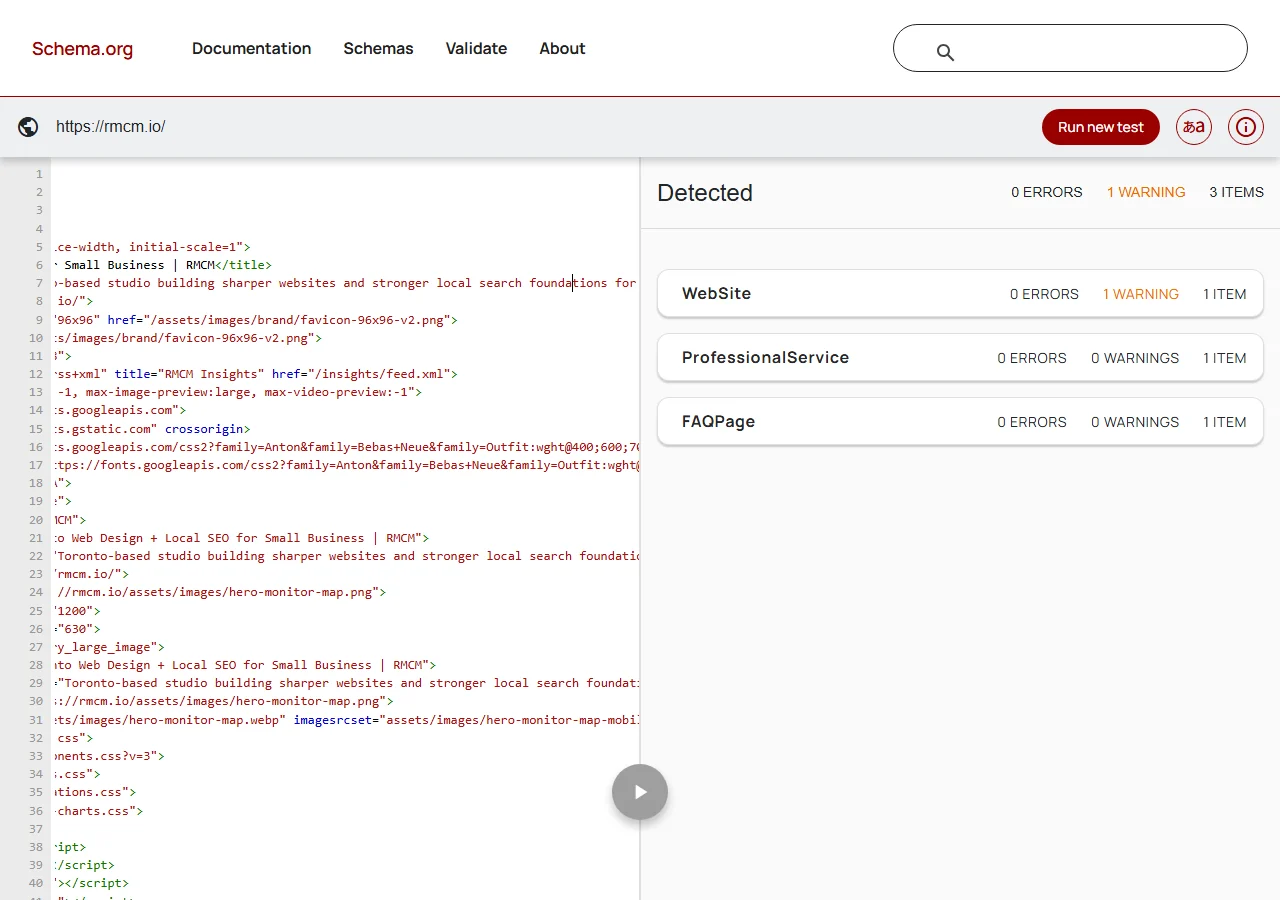
The Google tool only reports on things Google currently uses. Markup that's invalid in ways Google has no feature for can pass it in complete silence. The Schema.org validator doesn't care what Google supports, so it flags unknown property names, invalid values and type mismatches regardless.
Which is exactly what happened when I ran it on this site.
 1
2
3
1
2
3
Digging in, the cause was a speakable property sitting on a WebSite object. Schema.org lists speakable as valid on Article and WebPage only. WebSite isn't in that list, so the property was meaningless where it sat.
The genuinely embarrassing part is that an article on this very site says the speakable type is limited to news content and does nothing for a local business. So I was shipping a property my own writing says is pointless, in a place the vocabulary says is invalid. It had been there for months, and the Google tool never mentioned it.
The fix was deleting five lines. That's the whole point of running the second validator.
How to know it worked Both tools have been run on the same live URL and you have written down every error and every warning from each. Zero errors in one tool isn't a pass.
Common trap Treating warnings as optional. Errors break things loudly. Warnings are usually the quiet ones that mean a property is doing nothing at all, which is worse, because you think you have coverage you don't have.
The free scan checks whether your schema exists and validates, along with the rest of your technical setup, in under a minute.
GET THE FREE SCANCheck for duplicate and conflicting blocks
A very common real-world bug: your theme adds LocalBusiness markup, your SEO plugin adds it too, and now one page makes two different claims about your business.
- View source on your homepage.
- Search for
application/ld+jsonand count how many blocks come back. - Read each one. Do any two describe the same thing differently?
Two blocks isn't automatically wrong. A page can legitimately carry LocalBusiness plus BreadcrumbList plus FAQPage, which are describing different things. Two LocalBusiness blocks with different phone numbers is wrong, and neither will be trusted.
If you find duplicates, remove one at the source rather than trying to reconcile them. Usually that means turning off the theme's schema option and letting the plugin own it, or the reverse. Pick one owner.
How to know it worked You can list every JSON-LD block on the page and say what each one is for. No two describe the same entity with different values.
Common trap Checking only the homepage. Service pages and contact pages often carry their own copies from a different source.
Confirm Google actually picked it up
Validators tell you the markup is well formed. They don't tell you Google has seen it on your live page.
- Open Search Console and use URL Inspection on the page.
- Run Test live URL.
- Open the enhancements section and look for your structured data.
- If Google is still serving an older crawl, request indexing once and check back in a few days.
Then leave it alone. Structured data isn't something you tune weekly. Revisit it when your details change, when you redesign, or when a validator run during your regular audit turns something up.
How to know it worked The live URL test in Search Console reports your structured data as detected. That's the end of the job.
Common trap Expecting a visible change in search results. For most local businesses there won't be one, and that doesn't mean the markup failed.
The copy-paste blocks
Placeholders are in capitals. Replace every one, and delete any property you can't fill honestly.
<script type="application/ld+json">
{
  "@context": "https://schema.org",
  "@type": "YOUR_SPECIFIC_TYPE",
  "@id": "https://YOURDOMAIN.com/#business",
  "name": "YOUR BUSINESS NAME",
  "url": "https://YOURDOMAIN.com/",
  "telephone": "+1-416-555-0100",
  "priceRange": "$$",
  "image": "https://YOURDOMAIN.com/assets/storefront.jpg",
  "address": {
    "@type": "PostalAddress",
    "streetAddress": "123 Example Street",
    "addressLocality": "Toronto",
    "addressRegion": "ON",
    "postalCode": "M5V 1A1",
    "addressCountry": "CA"
  },
  "geo": {
    "@type": "GeoCoordinates",
    "latitude": 43.65107,
    "longitude": -79.34701
  },
  "openingHoursSpecification": [
    {
      "@type": "OpeningHoursSpecification",
      "dayOfWeek": ["Monday", "Tuesday", "Wednesday", "Thursday", "Friday"],
      "opens": "09:00:00",
      "closes": "17:00:00"
    }
  ],
  "sameAs": [
    "https://www.facebook.com/YOURPAGE",
    "https://www.instagram.com/YOURPAGE"
  ]
}
</script><script type="application/ld+json">
{
"@context": "https://schema.org",
"@type": "YOUR_SPECIFIC_TYPE",
"@id": "https://YOURDOMAIN.com/#business",
"name": "YOUR BUSINESS NAME",
"url": "https://YOURDOMAIN.com/",
"telephone": "+1-416-555-0100",
"address": {
"@type": "PostalAddress",
"addressLocality": "Toronto",
"addressRegion": "ON",
"addressCountry": "CA"
},
"areaServed": [
{ "@type": "City", "name": "Toronto" },
{ "@type": "City", "name": "Vaughan" },
{ "@type": "City", "name": "Markham" }
]
}
</script>Note on the service-area version. Google requires address, so you keep the property but narrow it to the city and region rather than publishing a home address. Hiding your address entirely is a decision with real trade-offs, and the service-area article works through them properly.
  "aggregateRating": {          <-- NOT for rating yourself
    "@type": "AggregateRating",
    "ratingValue": "4.9",
    "reviewCount": "127"
  }

Google documents aggregateRating and review under LocalBusiness as
properties for sites that review OTHER businesses. Self-serving review
markup is a common cause of a structured data manual action, and the
stars will not display. Your Google Business Profile reviews are what
produce stars for a local business.
The whole job on one page
Where this caps out
Genuinely nowhere. This is a ninety minute job with no expert component, and the guide should say so rather than manufacture a reason to hire someone. If you can copy, paste and read an error message, you can finish it.
The only honest caveat is the one in step 6: markup rots quietly. Properties get deprecated, your details change, a plugin update adds a second conflicting block. Running both validators once a quarter catches all of it in five minutes, which is why it's a line item in the DIY site audit rather than a thing you do once and forget.
Questions people ask
How much schema do I actually need?
Google documents exactly two required properties for LocalBusiness: name and address. Everything else, including telephone, url, geo, opening hours and price range, is recommended rather than required. So a valid block is much smaller than most people expect. Add the recommended properties because they describe you more completely, not because a validator will complain without them.
Can I add star ratings to my own schema?
No. Google documents aggregateRating and review under LocalBusiness as properties for sites that review other businesses, not for a business rating itself. Self-serving review markup is one of the more common reasons a site picks up a structured data manual action, and the stars won't show anyway. If you want stars in search results, that's what your Google Business Profile reviews do.
Will schema markup get me a rich result?
For a typical local business, usually not a visible one. LocalBusiness data can feed knowledge panels and local surfaces, but HowTo rich results were removed entirely and Google stopped showing FAQ rich results for every site in May 2026. Treat schema as machine readability rather than as a way to make your listing prettier, and be sceptical of anyone selling it on the promise of a fancier result.
Do I have to show everything I mark up on the page?
Yes. Google's structured data guidelines say plainly not to mark up content that isn't visible to readers of the page, and that the markup must be a true representation of the page content. Marking up hours or services that don't appear anywhere on the page can trigger a manual action, which removes rich result eligibility. Put the information on the page first, then describe it in the markup.
What if I have more than one location?
One block per location, each on its own page, each with its own address and its own URL in the url property. Don't try to describe five locations in one block on the homepage. If a single location has genuinely distinct parts with their own hours or phone numbers, that's what the department property is for, and Google asks that you include the store name with the department name.